


Most administrative professionals are not limited by a lack of time—they are limited by how their work is structured.
In many Canadian workplaces, from corporate headquarters in Toronto’s Financial District to growing tech firms in Vancouver and public sector offices in Ottawa, inefficiency does not stem from a lack of effort. Instead, it is born from fragmented digital systems, repetitive manual tasks, and poor cross-team visibility. The difference between an average administrative assistant and a high-performing Executive Assistant (EA) or Operations Coordinator is rarely just hard work; it is how effectively they leverage a modern digital tech stack to architect seamless workflows.
This comprehensive guide moves beyond a superficial list of applications. It explains which software tools dominate the Canadian professional landscape, how they are deployed in real-world corporate environments, and how mastering them directly elevates your strategic value within an organization.
Why Systems Architecture Now Defines Canadian Administrative Roles
Administrative work has undergone a permanent structural shift from manual task coordination to system-based execution. Calendars, high-volume inboxes, cross-provincial project boards, and client-facing documentation no longer exist as isolated components. They live inside interconnected digital ecosystems that must be continuously monitored, maintained, and optimized.
Consequently, administrative professionals are no longer just supporting tasks—they are acting as the systems administrators of day-to-day business operations. When these digital systems are properly aligned, work flows effortlessly. When they are neglected, bottlenecks multiply, communication breaks down, and critical data slips through the cracks.
Today, top-tier employers across Canada expect administrative staff to:
➽ Orchestrate disparate software ecosystems flawlessly without losing data integrity or accuracy.
➽ Establish and document structured digital processes that hybrid and remote teams can rely on.
➽ Eliminate communication friction across multiple time zones, from Pacific Standard Time (PST) to Eastern Standard Time (EST) and Atlantic Standard Time (AST).
➽ Ensure data handling compliance with privacy frameworks like the Personal Information Protection and Electronic Documents Act (PIPEDA) and provincial equivalents like Alberta’s PIPA or British Columbia’s PIPA.
The role has decisively moved from reactive “gatekeeping” to the proactive building and maintaining of operational efficiency.
Administrative Assistant and Organizational Skills
Administrative Assistant and Organizational Skills equips learners with the practical knowledge needed to manage daily office operations, improve organisation, and support workplace efficiency. The course covers essential administrative tasks, communication, time management, document handling, scheduling, and organisational techniques to help build confidence in a professional office environment.
Table of Contents
Office Suites: The Core Infrastructure of Administrative Work
Every corporate administrative role is built upon a fundamental productivity engine: Microsoft 365 or Google Workspace. These suites handle the baseline requirements of the modern office: document creation, spreadsheet tracking, presentations, and cloud-based file collaboration.
However, basic data entry literacy is no longer a competitive skill. True administrative mastery involves utilizing the advanced features of these platforms to systematically dismantle manual labor.
Microsoft 365: The Enterprise Standard
In Canada’s banking, legal, public sector, and traditional corporate environments, Microsoft 365 remains the undisputed standard. Advanced administrative assistants do not just type memos in Word; they construct dynamic templates with locked formatting and restricted editing fields.
In Excel, they move past simple data sorting to master advanced formulas ($VLOOKUP$, $XLOOKUP$, $INDEX/MATCH$), logical functions ($IF$, $AND$, $OR$), data cleaning tricks, and Pivot Tables. Understanding how to manipulate raw data allows an administrative professional to transform a messy, 5,000-row expense export into a clean, scannable budgetary brief for executive leadership. Furthermore, with the maturation of Microsoft Copilot, top admins use AI-driven prompting within Excel and Word to draft initial reports, analyze financial trends, and summarize long meeting transcripts instantly.
Google Workspace: The Agile Collaboration Choice
Dominating Canada’s technology centers, creative agencies, and fast-scaled startups, Google Workspace excels in real-time, cloud-native collaboration. The value here lies in the elimination of version-control confusion. Instead of emailing multiple iterations of a financial report back and forth (Budget_v2_Final_Edits_Review.xlsx), a single live Google Sheet serves as the single source of truth.
Admins leverage Google Forms integrated directly with Google Sheets to automate internal data collection—such as quarterly asset requests or employee onboarding inputs—removing the need for manual transcription.
Project Management Tools: Bringing Structure to Fluid Workflows
Modern administrative assistants are frequently tasked with coordinating complex cross-departmental operations, managing office moves, tracking vendor contracts, or overseeing executive committees. Relying on memory or chaotic email threads to track these moving parts invites operational failure.
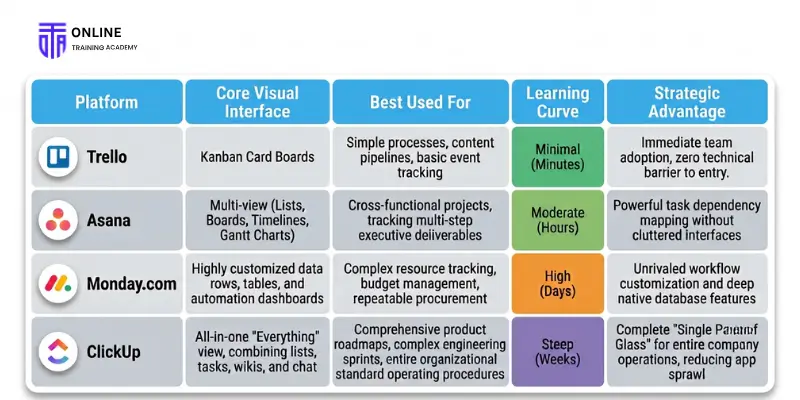
Project management tools like Trello, Asana, and Monday.com provide visual infrastructure for work. They centralize tasks, assignees, files, and deadlines into a shared interface, introducing absolute accountability to a team.
Comparing Project Management Platforms for Canadian Teams
For small to mid-sized teams, the ideal project management tool must support the existing workflow without overcomplicating it. The fundamental trade-off is between ease of adoption and granular control.
Trello: The Visual Gateway
Trello utilizes a classic Kanban layout (Lists of Cards that move from “To Do” to “In Progress” to “Done”). For an admin tracking a straightforward, linear process—such as office supply procurement or weekly newsletter content creation—Trello removes friction. However, as projects grow in complexity, Trello can feel limiting, particularly when tasks require rigid timelines or multi-tiered dependencies.
Asana: The Coordinator's Anchor
Asana balances approachability with deep structural control. It allows an administrator to view a project as a list, a board, a calendar, or a timeline (Gantt chart). This flexibility is invaluable when managing high-stakes executive events, such as an annual board of directors meeting.
An admin can map out tasks months in advance, set specific milestones, and establish task dependencies (e.g., Step B: “Book Venue Catering” cannot be started until Step A: “Finalize Attendee Headcount” is marked complete). This prevents premature execution and ensures no steps are missed.
Monday.com: The Custom Operational Engine
Monday.com operates less like a simple task checklist and more like a relational database. It offers maximum customization, allowing administrative professionals to build bespoke dashboards tracking budgets, vendor statuses, and team capacities simultaneously.
It features powerful built-in automations (e.g., “When a contract status changes to ‘Awaiting Signature’, notify the Legal VP via Slack and shift the due date by 48 hours”). The trade-off is setup time; without a clear design strategy, a Monday.com board can easily become overbuilt and confusing for the casual user.
Communication Platforms: Controlling the Information Torrents
Internal communication has radically migrated away from traditional email. The vast majority of Canadian enterprises now rely on Microsoft Teams or Slack to handle real-time internal dialog.
For administrative assistants, this dual-layered communication environment (internal chat vs. external email) creates a massive management challenge. Without intentional curation, these tools turn into continuous streams of distracting noise.
Advanced communication management requires proactive governance:
➽ Channel Architecture: Organizing chats by explicit topic, project, or department rather than relying on massive, chaotic group direct messages (DMs). This ensures that information remains searchable months down the line.
➽ Notification Auditing: Using status settings and notification filters deliberately to protect deep-focus work blocks while ensuring that urgent messages from C-suite executives bypass the filters.
➽ Thread Discipline: Enforcing the use of message threads to reply to specific comments, preventing a fast-moving channel from burying critical announcements.
By mastering these platforms, an administrative professional reduces internal email clutter by up to 50%, transforming how quickly information is prioritized and parsed across the company.
Next-Generation Scheduling: Defeating Calendar Coordination Friction
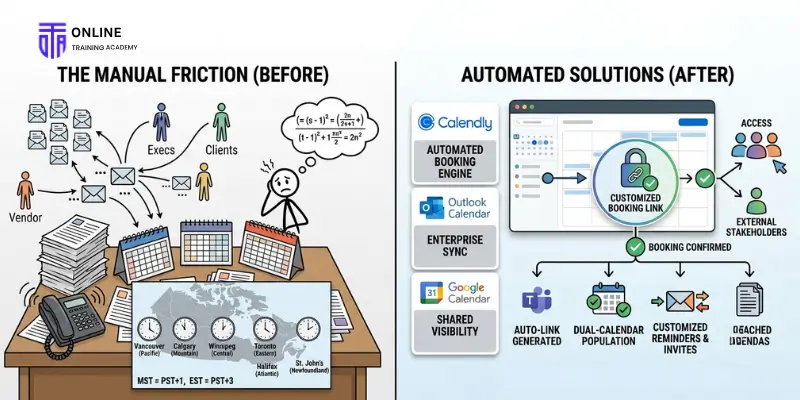
Calendar management is historically one of the most draining and time-consuming administrative tasks. Coordinating a simple 60-minute meeting between four busy executives, two external corporate clients, and an overseas vendor can easily consume a dozen emails and days of back-and-forth negotiation.
In Canada, this complexity is amplified by regional geography. A national administrative assistant must seamlessly calculate time differentials across the country’s six distinct time zones:
$$\text{Pacific (PST)} \rightarrow \text{Mountain (MST)} \rightarrow \text{Central (CST)} \rightarrow \text{Eastern (EST)} \rightarrow \text{Atlantic (AST)} \rightarrow \text{Newfoundland (NST)}$$
To permanently solve this coordination friction, professionals rely on automated scheduling engines like Calendly alongside the enterprise features of Outlook Calendar or Google Calendar.
Instead of proposing a static list of dates and times, an administrator configures Calendly with the executive’s precise availability parameters, buffers between meetings, and maximum daily meeting limits. A customized, secure booking link is then generated. External stakeholders can access this link, view real-time availability automatically adjusted to their local Canadian time zone, and select a slot that works perfectly for everyone.
Once booked, the system automatically:
- Generates a unique Microsoft Teams or Zoom video link.
- Populates both participants' digital calendars.
- Dispatches customized calendar invites and email reminders.
- Attaches necessary pre-reading documentation or agendas.
This eliminates the manual back-and-forth entirely, reducing hours of administrative friction down to a single, seamless digital interaction.
Advanced Email Automation: Taming the Corporate Inbox
Email remains a primary axis of external business communication, but it is also one of the easiest areas to optimize through automation. High-performing admins do not manually sort every email that lands in their or their executive’s inbox; they design systems that filter, prioritize, and categorize messages before human eyes ever see them.
Inbox Rules and Conditional Logic
Both Outlook and Gmail feature robust, native routing rules. Admins use conditional logic to instantly process incoming mail:
➽ High-Priority Routing: If an email arrives from a board member or C-suite executive, it is automatically flagged, marked as high importance, and moved to a dedicated, top-priority folder.
➽ Automated CC Filtering: Emails where the executive is merely CC’ed (indicating they are receiving the message for situational awareness rather than direct action) bypass the main inbox entirely and route directly to a “For Review” folder to preserve focus.
➽ Automated Invoice/Receipt Sorting: Messages containing keywords like “Invoice,” “Receipt,” “Billing,” or “Statement” are immediately tagged and duplicated to the finance or accounting folder for end-of-month reconciliation.
Quick Parts and Custom Email Templates
Administrative assistants frequently encounter repetitive inquiries—such as requests for corporate bios, standardized vendor onboarding forms, or public relations inquiries. Rather than typing out responses manually or copying and pasting from a separate document, advanced users leverage Quick Parts (Outlook) or Templates (Gmail). With a couple of keystrokes, a beautifully formatted, standardized response complete with hyperlinks and file attachments is populated instantly, ensuring professional brand consistency and saving hours of repetitive drafting every week.
Document Control & Cloud Storage Strategy at Scale
As Canadian enterprises pivot away from paper-based operations, digital file management has become a core operational vulnerability. Platforms like SharePoint, OneDrive, and Google Drive provide massive, secure cloud storage repositories, but their ultimate utility depends heavily on the structural taxonomy established by the administrative professional.
1. Standardization of File Naming Architecture
Admins enforce clear, unambiguous file naming rules across the organization to replace vague titles like Document1.pdf or Updated_Budget.xlsx. The gold standard for professional naming conventions utilizes a chronological, logical format:
$$\text{[YYYY-MM-DD]} \_ \text{[Project/Client Name]} \_ \text{[Document Type]} \_ \text{[Version Control]}$$
Example: 2026-07-02_OntarioExpansion_FinancialForecast_V3.pdf
2. Information Access Management & Compliance
In Canada, handling employee data, corporate financial records, or proprietary medical information requires strict compliance with privacy laws. Administrative professionals act as data gatekeepers. Within SharePoint or Google Drive, they establish granular folder permissions, ensuring that sensitive human resource folders or executive compensation matrices are strictly restricted to authorized personnel, while general marketing collateral remains accessible to the broader team.
The Power of Integration: Turning Isolated Tools into Systems

Using standalone software applications in isolation introduces massive operational friction. When a professional uses tools independently, they create a hidden layer of manual labor: copying data across tabs, manually downloaded files just to re-upload them elsewhere, and toggling back and forth between distinct dashboards. This is known as the “app tax”—it wastes time and increases human error.
A singular application is merely a tool. A system is an interconnected network of applications configured to work as a unified, automated pipeline.
The Shift from Application Usage to Operational Orchestration
Modern administrative assistants do not just use apps; they orchestrate workflows using no-code automation platforms like Zapier or Microsoft Power Automate. The ultimate goal is to completely eradicate manual data transfer between distinct software systems.
Visualizing the Operational Shift
1.Traditional Manual Workflow:High touch, high error rate.
- Read an incoming email client request.
- Open your calendar application in a separate tab to check availability.
- Manually create a meeting invite.
- Copy the meeting details and paste them into a team Slack channel.
- Download attached client files to your local desktop.
- Manually upload those client files into a specific corporate SharePoint folder.
2.Modern Integrated System Workflow:Zero touch, fully automated.
- Click a single custom "Schedule Meeting" action button directly inside the incoming email.
- An automated workflow engine instantly schedules the meeting on your calendar based on pre-set parameters.
- The system auto-generates a dedicated Microsoft Teams link and shares it with the team.
- The email attachments are scraped and routed to the correct SharePoint directory instantly.
Strategic Value of Workflow Automation
By designing and deploying integrated digital systems, administrative professionals deliver three measurable, high-value impacts to Canadian organizations:
➽ Absolute Data Accuracy: Eliminating manual copy-and-paste tasks removes the risk of human transcription errors, typos, and misplaced customer information.
➽ Drastic Speed of Execution: Workflows move instantly across platforms 24/7, keeping teams updated without waiting for human intervention.
➽ Measurable Cost Reductions: Automating minor administrative tasks saves an average of 5 to 10 hours per week per employee, allowing the business to allocate human talent to complex, revenue-driving initiatives.
Conclusion
Software applications are no longer a simple digital replacement for a paper filing cabinet—they form the operational engine of the modern workplace.
Administrative professionals who master these tools and learn to integrate them effectively handle greater operational responsibility, prevent systemic errors, and dramatically improve their team’s speed. Conversely, those who cling to manual processes will find it increasingly difficult to scale their value within fast-moving organizations. By intentionally curating a focused software stack and building automated systems, administrative assistants can transform their role from an overhead support function into a strategic asset for any Canadian business.
FAQs
Advanced competency in Microsoft 365 or Google Workspace (specifically Excel/Sheets and Outlook/Gmail) is the baseline. Top candidates also demonstrate proficiency in:
- Project Management: Asana, Monday.com
- Communication: Microsoft Teams, Slack
- Scheduling: Calendly
- Workflow Automation: Zapier, Microsoft Power Automate
- Microsoft 365: The standard for traditional sectors (banking, legal, public sector) due to its robust data security, offline processing, and strict compliance architecture.
- Google Workspace: The preferred choice for agile startups, tech, and creative agencies prioritizing intuitive, lightweight real-time collaboration for remote teams.
Any software handling personal identifiable information (PII) must use enterprise-grade encryption. Administrators should:
- Configure strict user permissions in cloud storage.
- Ensure data centers are located in Canada when contractually required.
- Implement robust data-retention settings.
- Disable public link sharing for sensitive files.
Yes. Platforms like Asana or Monday.com can reduce internal email volume by up to 80%. By shifting conversations, file sharing, and action items directly into context-specific task cards, internal communication becomes clear and traceable, reserving traditional email primarily for external clients.
- Zapier: A highly accessible, user-friendly tool excellent at connecting thousands of diverse, everyday SaaS applications (e.g., linking Typeform to Slack).
- Microsoft Power Automate: An enterprise-grade engine designed for deep, complex database manipulation and large-scale governance within the Microsoft 365 ecosystem. It is much more powerful but carries a steeper learning curve.
Base your choice on operational complexity:
- Trello: Best for simple, sequential, visual workflows.
- Asana: Best for parallel projects tracking strict deadlines and cross-departmental dependencies.
- Monday.com: Best for data-heavy operations, asset procurement, and workflows requiring extensive custom automation.
Learn More





Get a FREE Course
- Learn useful skills online free
- Get CPD accredited certificate
- Add it to your CV today!