
Introduction
Starting something new can be exciting, but it can also be difficult to know where to begin. That’s especially true when you’re considering Data Entry Administrator Training. With so many skills, software programs, and career tips available online, it’s easy to spend time learning things that aren’t immediately useful.
The good news is that you don’t need to master everything before you start. Most successful Data Entry Administrators build their skills step by step, beginning with the fundamentals before progressing to more advanced workplace tasks. A structured approach not only makes learning more manageable but also helps you develop the confidence employers value.
This checklist is designed to guide you through that process. From preparing your workspace and learning essential software to practising the right skills and tracking your progress, you’ll find practical steps to help you start your training with confidence and stay focused on what matters most.
Table of Contents
Data Entry Administrator Training
Data Entry Administrator Training equips you with the essential skills to manage data accurately, use office software efficiently, maintain organised records, and follow professional administrative practices, helping you build confidence for a wide range of data entry and office support roles.
What Should You Know Before Starting Data Entry Administrator Training?
The most important thing to know is that you don’t need previous experience to begin. While basic computer knowledge is helpful, Data Entry Administrator Training is designed to teach the skills needed to work confidently in modern administrative roles.
Instead of trying to learn everything at once, focus on building a strong foundation. Understanding how to use a computer, navigate digital files, and type comfortably will make it much easier to learn spreadsheets, databases, and other administrative tools as your training progresses.
It’s also worth remembering that becoming a successful Data Entry Administrator isn’t about typing faster than everyone else. Accuracy, organization, problem-solving, and attention to detail are just as important. Developing these habits early will support your learning and prepare you for real workplace expectations.
A Beginner's Readiness Checklist Before You Start
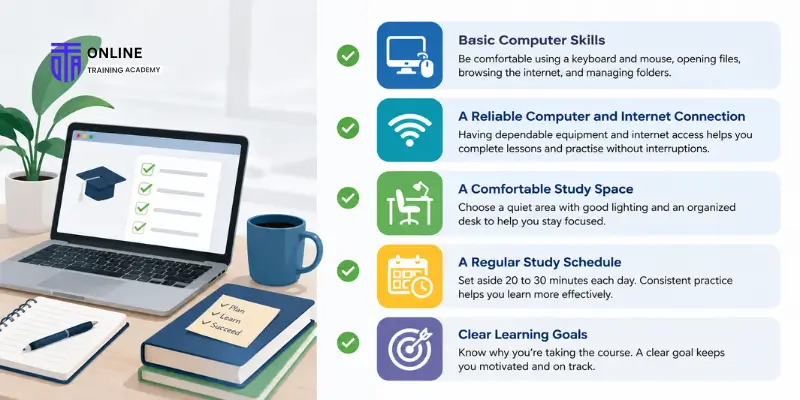
Before beginning your training, take a few minutes to make sure you have the basics in place. This simple checklist can help you start with realistic expectations and create a better learning experience.
✔ Basic Computer Skills
You should feel comfortable using a keyboard and mouse, opening files, browsing the internet, and managing folders. You don’t need advanced technical knowledge, but a solid understanding of everyday computer tasks will make learning easier.
✔ A Reliable Computer and Internet Connection
If you’re studying online, having dependable equipment and internet access allows you to complete lessons, download resources, and practise without unnecessary interruptions.
✔ A Comfortable Study Space
Choose a quiet area where you can concentrate. A comfortable chair, good lighting, and an organized desk can help you stay focused during study sessions.
✔ A Regular Study Schedule
Learning a new skill is easier when you practise consistently. Setting aside even 20 to 30 minutes each day is often more effective than trying to complete everything in one long session.
✔ Clear Learning Goals
Ask yourself why you’re taking the course. Whether you want to prepare for your first administrative role, improve your office skills, or explore a new career path, having a clear goal will help keep you motivated.
Assess Your Starting Point
Every learner begins with a different level of experience, and that’s completely normal. Before starting your training, take a moment to evaluate your current skills. This isn’t a test—it’s simply a way to identify where you may need more practice.
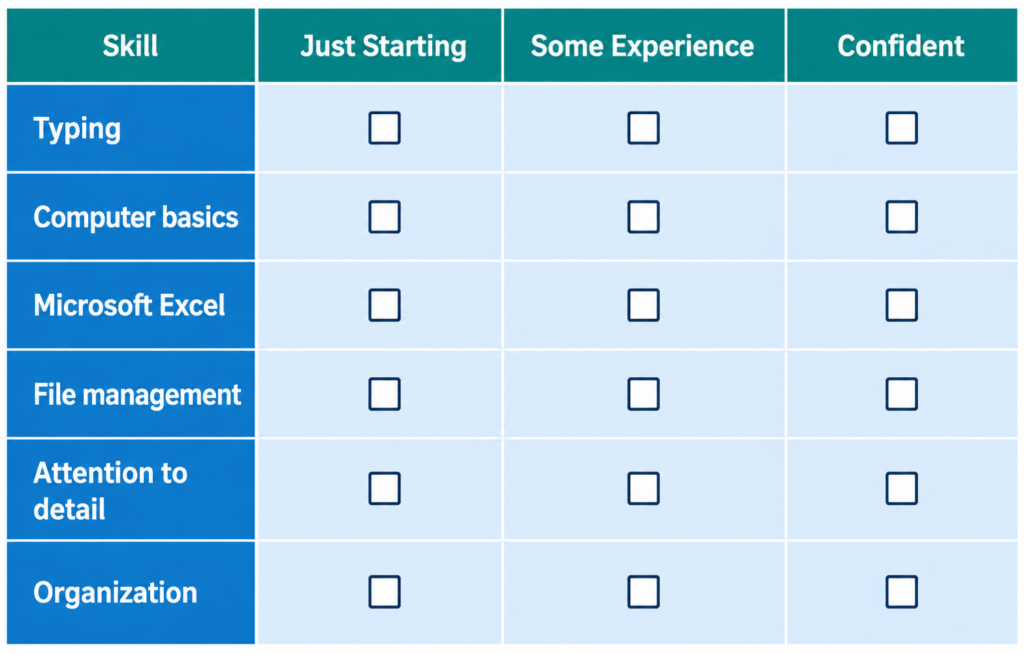
If most of your answers fall into the “Just Starting” column, don’t be discouraged. That’s exactly what training is for. As you progress through your course, revisit this checklist to see how your confidence and abilities improve over time.
Your Essential Learning Checklist
As you begin Data Entry Administrator Training, focus on mastering these core skills before moving on to more advanced topics.
✔ Typing Accuracy
Aim to enter information correctly rather than as quickly as possible. Speed naturally improves with regular practice, but accuracy should always come first.
✔ Attention to Detail
Develop the habit of reviewing your work carefully. Small mistakes can lead to larger problems, so learning to spot errors early is an important skill.
✔ Time Management
Practise completing tasks within a reasonable timeframe while maintaining quality. Building good time management habits will prepare you for busy workplace environments.
✔ Computer Confidence
Become comfortable using everyday office applications, managing digital files, and navigating different software programs. The more familiar you are with technology, the easier it will be to adapt to new workplace systems.
✔ Organization
Learn to keep documents, folders, and digital records well organized. Good organization improves efficiency and makes information easier to locate when needed.
✔ Communication
Even in a role focused on data, communication matters. Being able to ask questions, clarify information, and work effectively with colleagues contributes to smoother office operations.
Software Every Beginner Should Learn First
One of the biggest questions new learners ask is, “Which software should I learn first?” The answer is simpler than many people expect. Start with the programs used in most administrative workplaces before moving on to more specialized tools.
Learn First
These applications form the foundation of most Data Entry Administrator roles.
Microsoft Excel
Excel is one of the most widely used tools for entering, organizing, and analyzing data. Learn how to create spreadsheets, format cells, sort and filter data, and use basic formulas.
Microsoft Word
Word is commonly used to create reports, letters, forms, and business documents. Understanding formatting, tables, and document editing will support many administrative tasks.
Google Sheets
Many organizations use cloud-based tools for collaboration. Learning Google Sheets will help you work with shared spreadsheets and update information in real time.
Learn Next
Once you’re comfortable with the basics, expand your skills with tools that support everyday office work.
- Google Workspace
- PDF editing software
- Cloud storage platforms such as Google Drive or OneDrive
- Email and calendar applications
Learn Later
As your confidence grows, you can explore more advanced systems used by specific organizations.
- Database management software
- Customer Relationship Management (CRM) systems
- AI-assisted office tools
- Electronic document management systems
Learning these tools gradually prevents information overload and helps you build confidence as your skills develop.
A Simple 6-Week Learning Roadmap
Following a structured plan can make learning feel much more manageable. Instead of trying to master everything at once, focus on one area at a time.
Week 1: Build Your Foundations
- Improve keyboard confidence.
- Practise typing accurately.
- Learn basic computer navigation and file management.
Week 2: Learn Spreadsheet Basics
- Create and edit spreadsheets.
- Format rows and columns.
- Sort and filter information.
- Enter data consistently.
Week 3: Develop Data Entry Skills
- Practise entering information from sample documents.
- Review your work for accuracy.
- Learn simple quality-checking techniques.
- Enter data consistently.
Week 4: Improve Organization
- Create logical folder structures.
- Name files consistently.
- Organize digital records for easy retrieval.
Week 5: Complete Practice Projects
- Work with sample spreadsheets.
- Organize customer or inventory records.
- Simulate everyday administrative tasks.
Week 6: Review and Refine
- Measure your typing accuracy.
- Repeat exercises that need improvement.
- Complete a full mock data entry project from start to finish.
Remember, everyone learns at a different pace. Use this roadmap as a guide rather than a strict schedule.
Practise Before You Apply for Jobs

Completing a training course is an important milestone, but employers also want to know that you can apply your knowledge in practical situations. Before submitting job applications, use this checklist to assess your readiness.
Can you confidently…
✔ Enter information accurately into a spreadsheet?
✔ Organize files and folders logically?
✔ Sort and filter data in Microsoft Excel?
✔ Identify duplicate or incorrect records?
✔ Follow written instructions carefully?
✔ Complete tasks within a reasonable deadline?
✔ Review your work before submitting it?
If you answered “not yet” to some of these questions, don’t worry. They simply highlight areas where a little more practice can make a big difference.
Common Mistakes New Learners Should Avoid
Most beginners improve quickly once they recognize the habits that slow their progress. Avoiding a few common mistakes can make your learning experience much more effective.
Prioritizing Speed Over Accuracy
Typing quickly is helpful, but accuracy should always come first. Developing good habits early reduces errors and builds confidence.
Skipping Spreadsheet Practice
Many beginners spend most of their time practising typing while overlooking Excel or Google Sheets. Since spreadsheets are central to many administrative roles, regular practice is essential.
Trying to Learn Everything at Once
There are many software programs available, but you don’t need to master them all immediately. Focus on the fundamentals before moving on to more advanced tools.
Not Reviewing Your Work
Proofreading isn’t just for writers. Taking a few extra minutes to review your work helps you identify mistakes and improve your attention to detail.
Practising Inconsistently
Short, regular practice sessions are usually more effective than occasional long study days. Consistency helps build confidence and reinforces new skills over time.
How to Track Your Progress
Improvement is easier to see when you measure it. Tracking your progress also helps you stay motivated and identify areas that need more attention.
Consider monitoring:
- Your typing speed and accuracy.
- The number of practice exercises completed each week.
- Your confidence using Excel and Google Sheets.
- Your ability to organize files without assistance.
- The number of errors you identify during self-review.
- Completed mock data entry projects.
Even small improvements are worth celebrating. Consistent progress is a stronger indicator of future success than trying to become an expert overnight.
Preparing for Today's Digital Workplace

Administrative work continues to evolve, so it’s helpful to become familiar with the technologies used in modern offices. Alongside your core training, take time to explore cloud-based collaboration, digital document sharing, and AI-assisted workplace tools.
You don’t need to become an expert in every new technology. Instead, focus on staying curious and adaptable. Employers value professionals who are willing to learn, embrace new systems, and continue developing their skills throughout their careers.
Conclusion
Every successful Data Entry Administrator starts with the same foundation—learning the basics, practising consistently, and improving one skill at a time. Following a structured checklist makes the process less overwhelming and helps you focus on the skills that matter most.
Whether you’re preparing for your first administrative role or looking to build confidence with digital workplace tools, Data Entry Administrator Training provides a clear path forward. By mastering the fundamentals, tracking your progress, and continuing to learn, you’ll be well prepared for the responsibilities of today’s administrative workplaces.
If you’re ready to begin, use this checklist as your starting point and take each step at your own pace. Every practice session brings you closer to becoming a confident and capable Data Entry Administrator.
FAQs
Not usually. Most beginners can learn data entry with consistent practice and the right training. While typing is part of the job, success also depends on accuracy, organization, attention to detail, and confidence using everyday office software.
The learning timeline varies depending on your experience and how often you practise. Many beginners develop a solid foundation within a few weeks, while becoming fully confident with spreadsheets, databases, and administrative tasks may take longer.
Start with Microsoft Excel, Microsoft Word, and Google Sheets, as these are commonly used in administrative roles. Once you’re comfortable with these tools, you can move on to cloud storage platforms, database systems, and other workplace software.
Yes. Most Data Entry Administrator Training courses are designed for beginners and teach skills progressively. A willingness to learn and practise consistently is often more important than having prior experience.
There’s no single requirement, but many employers value accuracy just as much as speed. Aim to type comfortably while maintaining a high level of accuracy, then continue improving your speed through regular practice.
Absolutely. Training typically starts with the fundamentals before introducing more advanced administrative tasks, making it suitable for learners with little or no previous experience.
Learn More





Get a FREE Course
- Learn useful skills online free
- Get CPD accredited certificate
- Add it to your CV today!