1678 Students
Xero Accounting Software Complete Course – Beginner, Intermediate & Advanced teach you everything on the topic thoroughly from scratch so you can achieve a professional certificate for free to showcase your achievement in professional life. This Xero Accounting Software Complete Course – Beginner, Intermediate & Advanced is a comprehensive, instructor-guided course, designed to provide a detailed understanding of the nature …
Xero Accounting Software Complete Course – Beginner, Intermediate & Advanced teach you everything on the topic thoroughly from scratch so you can achieve a professional certificate for free to showcase your achievement in professional life. This Xero Accounting Software Complete Course – Beginner, Intermediate & Advanced is a comprehensive, instructor-guided course, designed to provide a detailed understanding of the nature of the related sector and your key roles within it.
To become successful in your profession, you must have a specific set of skills to succeed in today’s competitive world. In this in-depth training course, you will develop the most in-demand skills to kickstart your career, as well as upgrade your existing knowledge & skills.
The training materials of this course are available online for you to learn at your own pace and fast-track your career with ease.
The course takes learners from fundamental Xero functions to more advanced accounting and financial management tasks.
The course suits learners at different experience levels who want to develop Xero and accounting software knowledge in a Canadian business context.
Xero knowledge can be useful for people working with financial records and accounting software across Canada’s small business and accounting sectors.
Xero knowledge can complement roles in bookkeeping, accounting, payroll, and financial administration. Salaries vary by province, employer, experience, qualifications, and responsibilities.
The course is structured to support learners starting with Xero while also offering more advanced accounting software topics.
All of our courses, including this Xero Accounting Software Complete Course – Beginner, Intermediate & Advanced, are fully accredited, providing you with up-to-date skills and knowledge and helping you to become more competent and effective in your chosen field.
All of our courses are accredited by the CPD Certification Service as conforming to universally accepted Continuing Professional Development (CPD) guidelines.
The Quality Licence Scheme (QLS) is a trusted endorsement framework that certifies high-quality, non-regulated training programmes across various sectors.
The Association of Healthcare Trainers (AoHT) promotes high-quality healthcare training, supporting providers to deliver relevant, industry-aligned education and improve professional standards.
Once you’ve successfully completed your course, you will immediately be sent a digital certificate. Also, you can have your printed certificate delivered by post (shipping cost £3.99). All of our courses are fully accredited, providing you with up-to-date skills and knowledge and helping you to become more competent and effective in your chosen field. Our certifications have no expiry dates, although we do recommend that you renew them every 12 months.
The detailed curriculum outline of our Xero Accounting Software Complete Course – Beginner, Intermediate & Advanced Course is as follows:
The course book provides a supporting reference for the accounting software topics covered throughout the training. Learners can use it to reinforce key concepts and review important Xero functions.
This comprehensive section brings together the full learning pathway, progressing from essential Xero functions to more advanced accounting tasks. It gives learners a structured route through the software without requiring previous Xero experience.
Begin by becoming familiar with Xero and the main areas used for everyday accounting tasks. Learners explore the software environment and develop an understanding of how different functions fit together.
A well-organised accounting system provides a stronger foundation for accurate bookkeeping. This section covers key setup considerations and the information needed to begin using Xero for business accounts.
Managing customer and supplier information is central to day-to-day accounting. Learners explore how these records support sales, purchases, invoices, bills, and other financial transactions.
Fixed assets require appropriate records so businesses can monitor their value and related accounting entries. This section introduces fixed asset management and the accounting information associated with business assets.
Recording money coming into and leaving a business is a core bookkeeping responsibility. Learners examine how bank payments and receipts are entered and managed within Xero.
Small business expenses can quickly become difficult to track without consistent records. This section explains how petty cash transactions can be recorded and monitored as part of the wider accounting system.
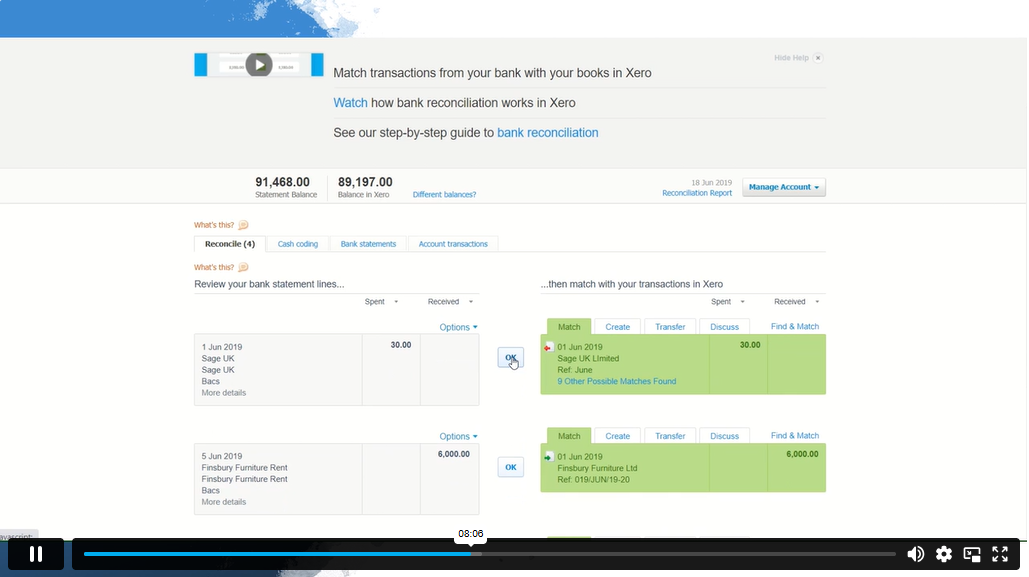
Bank reconciliation helps identify differences between accounting records and bank activity. Learners develop an understanding of the reconciliation process and how it contributes to more accurate financial records.
Business credit cards generate transactions that need to be recorded and reviewed correctly. Learners explore how credit card activity can be incorporated into the accounting records and monitored effectively.
Aged reports provide useful information about outstanding customer and supplier balances. Learners explore how these reports can help businesses review overdue amounts and manage cash flow more effectively.
Payroll and journal entries involve important accounting records that need to be handled carefully. Learners explore how these transactions are recorded and how journals can be used to make appropriate accounting adjustments.
This topic introduces tax return processes within accounting software. For Canadian learners, the principles should be considered alongside Canada’s GST/HST requirements rather than UK VAT rules.
Accounting mistakes can affect financial records if they are not identified and corrected properly. Learners explore approaches to reviewing errors and making appropriate corrections within Xero.
The final section moves into more advanced use of Xero and brings together the knowledge developed throughout the course. Learners can build greater confidence managing accounting information, reviewing financial activity, and using the software for broader bookkeeping responsibilities.
Yes, Xero is user-friendly and can be learned independently, especially with a structured course like this one that takes you from beginner to advanced levels.
Both are popular accounting software, but Xero is often preferred for its cloud-based accessibility, ease of use, and strong automation features, while QuickBooks may be better for larger businesses with complex reporting needs.
Yes, Xero works in Canada and supports Canadian taxes, currencies, and compliance with local accounting standards.
The time depends on your prior accounting knowledge. Beginners may take a few weeks to gain confidence, while those with accounting experience can learn the basics in a few days. Advanced mastery may take a few months.
Accountants prefer Xero for its cloud-based platform, real-time reporting, automated processes, ease of collaboration, and seamless integration with other business tools.
The “best” accounting software depends on business needs. Xero, QuickBooks, and Sage are among the top choices globally for small to medium-sized businesses due to their features, reliability, and cloud accessibility.
| Xero Accounts Course book | |||
| Xero Accounts Course book | 02:00:00 | ||
| Xero Accounting Software Complete Course - Beginner, Intermediate & Advanced | |||
| Intro to your tutor and Xero course | 00:03:00 | ||
| Getting Started | |||
| Setting up / Creating Company | 00:15:00 | ||
| Setting up of the System | |||
| Virtual Tour of Xero Accounts | 00:13:00 | ||
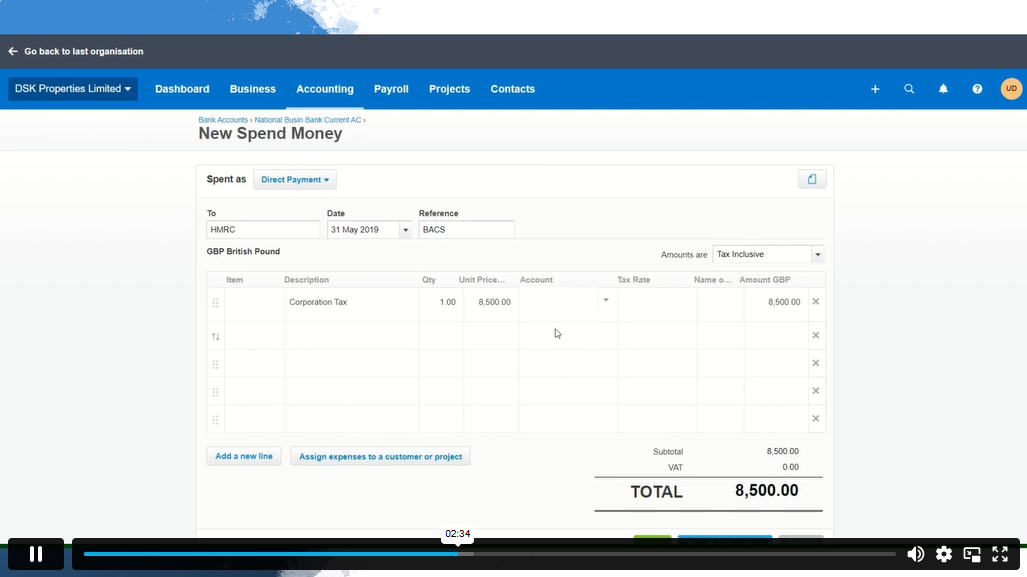
| Add Business Bank Accounts and Cash Account | 00:10:00 | ||
| Chart of Accounts and conversion balances | 00:17:00 | ||
| Creating/Deleting (Tracking categories) | 00:05:00 | ||
| Customers and Suppliers | |||
| Setting up Customers and Suppliers (Apply default settings) | 00:15:00 | ||
| Create a Project | 00:04:00 | ||
| Entering Purchase (Supplier Invoice), Purchase Credit Note, Purchase Order | 00:25:00 | ||
| Entering Sales (Customer Invoice), Sales Credit Note, Sales Order | 00:16:00 | ||
| Fixed Assets | |||
| Entering Fixed Assets (Asset Register) | 00:09:00 | ||
| Inventory | 00:03:00 | ||
| Bank Payments and Receipts | |||
| Bank Feed or Import a Statement | 00:11:00 | ||
| Entering Bank Payments, Bank Receipts | 00:06:00 | ||
| Internal Bank Transfer/Petty Cash Transfer/CC Payment | 00:05:00 | ||
| Adding Repeating bill (DD/STO etc.) | 00:08:00 | ||
| Cash Coding | 00:04:00 | ||
| Petty Cash | |||
| Petty Cash | 00:17:00 | ||
| Bank Reconciliation | |||
| Bank Reconciliation | 00:17:00 | ||
| Business Credit Card Account | |||
| Business Credit Card Account | 00:12:00 | ||
| Aged Reports | |||
| Aged Reports | 00:05:00 | ||
| Payroll and Journals | |||
| Payroll and Journals | 00:13:00 | ||
| Vat Return | |||
| Vat Return | 00:13:00 | ||
| Correction of Error | |||
| Correction of Errors | 00:07:00 | ||
| Xero Accounting Software Advanced | |||
| CIS Return | 00:20:00 | ||
| Accrual and Prepayment (1) | 00:16:00 | ||
| Accrued Income and Deferred Income | 00:10:00 | ||
| Depreciation Journal | 00:08:00 | ||
| Management Reports | 00:12:00 | ||
| Preparation of Budget | 00:07:00 | ||
| Cash Flow | 00:06:00 | ||
| Payment Services on Xero | 00:06:00 | ||
| Bank Rules | 00:08:00 | ||
| Multicurrency on Xero | 00:05:00 | ||
| App Marketplace | 00:04:00 | ||
| Introduction of Resources during Covid-19 | 00:08:00 | ||
| Correction of Errors | 00:07:00 | ||
$125 Original price was: $125.$20Current price is: $20. ex VAT
SAVE 84% - OFFER ENDS SOON
![]() |
01 Year of full Course access
Advance
Endorsed Certificate of Compleiton