1578 Students
QuickBooks: Self Employed introduces learners to the core tools used to organise income, expenses, receipts, bank transactions, invoices, and financial records. The course covers account connections, transaction rules, receipt management, invoicing, reports, manual entries, and the QuickBooks Self-Employed and QuickBooks Online interfaces. It is suitable for freelancers, contractors, sole proprietors, small business owners, and people supporting bookkeeping tasks in Canada. …
QuickBooks: Self Employed introduces learners to the core tools used to organise income, expenses, receipts, bank transactions, invoices, and financial records. The course covers account connections, transaction rules, receipt management, invoicing, reports, manual entries, and the QuickBooks Self-Employed and QuickBooks Online interfaces. It is suitable for freelancers, contractors, sole proprietors, small business owners, and people supporting bookkeeping tasks in Canada.
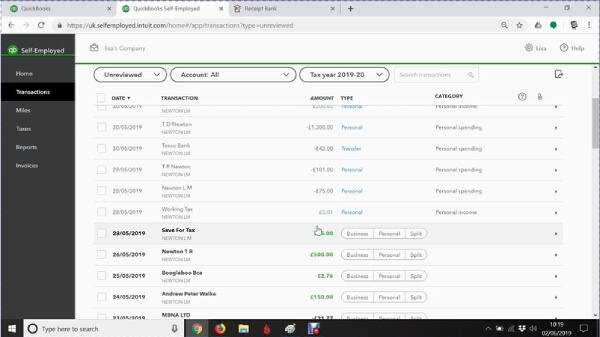
The training helps learners develop confidence with everyday bookkeeping activities and keep business financial information organised. Learners explore how bank transactions can be imported, categorised, and managed using rules, while also learning how to create invoices and review reports. QuickBooks supports income and expense tracking, bank connections, receipt records, and business reporting for self-employed users.
Online, self-paced learning makes it easier to study around work and business commitments. Thames College provides structured course materials and certification on successful completion, giving learners a flexible way to build QuickBooks knowledge for bookkeeping, business administration, and self-employed work.
The course focuses on the everyday QuickBooks tasks that self-employed workers and small business users commonly need to understand.
QuickBooks knowledge can be useful for people managing their own finances or supporting bookkeeping and administration in small Canadian businesses.
Learning QuickBooks can make routine financial record keeping easier to understand and manage, particularly for people working independently or in small businesses.
QuickBooks knowledge can complement roles involving bookkeeping, accounting support, administration, and small business financial records. Actual salaries vary by province, employer, experience, and responsibilities.
The course is designed to provide an accessible introduction to QuickBooks and does not require previous accounting qualifications.
All of our courses, including this QuickBooks Course, are fully accredited, providing you with up-to-date skills and knowledge and helping you to become more competent and effective in your chosen field.
All of our courses are accredited by the CPD Certification Service as conforming to universally accepted Continuing Professional Development (CPD) guidelines.
The Quality Licence Scheme (QLS) is a trusted endorsement framework that certifies high-quality, non-regulated training programmes across various sectors.
The Association of Healthcare Trainers (AoHT) promotes high-quality healthcare training, supporting providers to deliver relevant, industry-aligned education and improve professional standards.
The detailed curriculum outline of our QuickBooks is as follows:
Begin with an introduction to QuickBooks Self-Employed and its role in organising business finances. Learners become familiar with the main areas of the platform and the types of bookkeeping tasks covered throughout the course.
Connecting a bank account is an important part of keeping financial information up to date. This module introduces the process of linking an account and bringing transactions into QuickBooks for review and categorisation.
Receipts provide useful records for business expenses and financial tracking. Learners explore how receipts are handled in the QuickBooks inbox and how they can support organised transaction records.
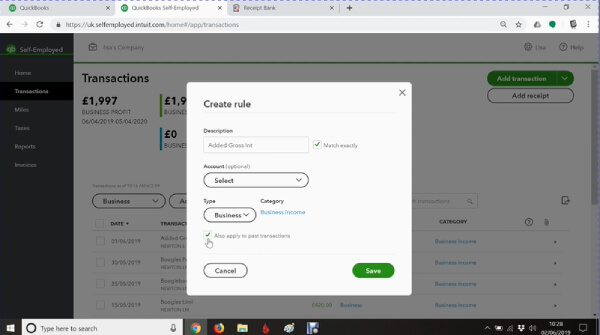
Repeated transactions can take time to categorise manually. This section explains how transaction rules can help organise recurring activity and reduce repetitive data entry when reviewing business transactions.
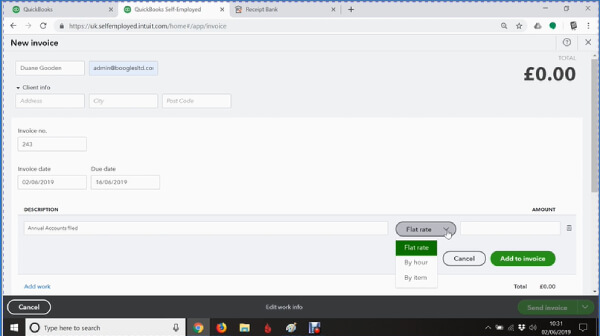
Invoicing is a key task for freelancers, contractors, and self-employed workers. Learners explore how to create an invoice and understand the information needed to record amounts owed by customers.
The home page provides an overview of important account activity. Learners look at the information displayed there and how the interface can help them navigate common QuickBooks tasks.
Businesses may use more than one bank or financial account. This module looks at connecting an additional account and understanding how its transactions can be brought into QuickBooks for review.
Learners build on their earlier knowledge by creating a bank rule for another connected account. The focus is on using transaction patterns to make recurring entries easier to categorise.
Rules may need updating when business circumstances or transaction patterns change. This section explains how existing rules can be reviewed and amended to improve the accuracy of transaction categorisation.
Financial reports turn recorded transactions into information that is easier to review. Learners explore the reporting area and consider how reports can help self-employed users understand income, expenses, and business performance.
Not every business transaction will necessarily appear through a connected bank account. Learners look at adding transactions manually so important financial activity can still be included in their records. QuickBooks Self-Employed supports manual transaction entry for activity that does not come through connected banking.
QuickBooks Self-Employed and QuickBooks Online have different features and interfaces, so understanding the connection between the two helps learners navigate the software more confidently. The module introduces the interface and highlights how users work with the relevant QuickBooks environment.
Finish by bringing the main QuickBooks functions together, from connected accounts and receipts to transaction rules, invoices, manual entries, and reports. Learners can review the key concepts and consider how they apply to everyday bookkeeping tasks.
You will learn how to connect accounts, review transactions, organise receipts, create bank rules, create invoices, add transactions manually, access reports, and navigate the QuickBooks Self-Employed interface.
Yes. The course starts with an introduction to the software and gradually covers common bookkeeping functions. No previous QuickBooks experience is required.
The course includes an introduction to the QuickBooks Self-Employed and QuickBooks Online interfaces. Its main focus, however, is QuickBooks Self-Employed and the everyday bookkeeping functions covered in the course modules.
No. Previous accounting or bookkeeping experience is not required. Basic computer skills and an interest in managing business financial records are helpful.
Yes. Learners receive certification after successfully completing the course, providing evidence of their QuickBooks training for professional development and workplace learning.
It can be useful for freelancers and independent workers who need to organise business income, expenses, receipts, invoices, and other financial records. Canadian users should also consider the bookkeeping and tax requirements that apply to their specific business structure.
| QuickBooks: Self Employed | |||
| Module 01: Introduction | 00:02:00 | ||
| Module 02: First Account Connected | 00:04:00 | ||
| Module 03: Receipts in Inbox | 00:01:00 | ||
| Module 04: Adding Rules | 00:02:00 | ||
| Module 05: Create an Invoice | 00:05:00 | ||
| Module 06: Home Page Details | 00:03:00 | ||
| Module 07: Connect another Account | 00:05:00 | ||
| Module 08: Creating Bank Rule on 070 Account | 00:06:00 | ||
| Module 09: Amending the Rules | 00:01:00 | ||
| Module 10: Reports | 00:03:00 | ||
| Module 11: Transaction Adding- When Not on the Bank | 00:01:00 | ||
| Module 12: QBSE and QBO Interface | 00:06:00 | ||
| Module 13: Conclusion | 00:02:00 | ||
$125 Original price was: $125.$20Current price is: $20. ex VAT
SAVE 84% - OFFER ENDS SOON
![]() |
01 Year of full Course access
Intermediate
Endorsed Certificate of Compleiton