22 Students
Excel 2016 Intermediate course teaches you everything on the topic thoroughly from scratch so you can achieve a professional certificate for free to showcase your achievement in professional life. This Excel 2016 Intermediate course is a comprehensive, instructor-guided course, designed to provide a detailed understanding of the nature of the related sector and your key roles within it. To become …

Excel 2016 Intermediate course teaches you everything on the topic thoroughly from scratch so you can achieve a professional certificate for free to showcase your achievement in professional life. This Excel 2016 Intermediate course is a comprehensive, instructor-guided course, designed to provide a detailed understanding of the nature of the related sector and your key roles within it.
To become successful in your profession, you must have a specific set of skills to succeed in today’s competitive world. In this in-depth training course, you will develop the most in-demand skills to kickstart your career, as well as upgrade your existing knowledge & skills.
The training materials of this course are available online for you to learn at your own pace and fast-track your career with ease.
Anyone with a knack for learning new skills can take this Excel 2016 Intermediate course. While this comprehensive training is popular for preparing people for job opportunities in the relevant fields, it also helps to advance your career for promotions.
Once you’ve successfully completed your Excel 2016 Intermediate course, you will immediately be sent a digital certificate. Also, you can have your printed certificate delivered by post (shipping cost £3.99). Our certifications have no expiry dates, although we do recommend that you renew them every 12 months.
All of our courses, including this Excel 2016 Intermediate course, are fully accredited, providing you with up-to-date skills and knowledge and helping you to become more competent and effective in your chosen field.
At the end of the course, there will be an online assessment, which you will need to pass to complete the course. Answers are marked instantly and automatically, allowing you to know straight away whether you have passed. If you haven’t, there’s no limit on the number of times you can take the final exam. All this is included in the one-time fee you paid for the course itself.
| Introduction | |||
| Introduction | 00:01:00 | ||
| Customizing Excel | |||
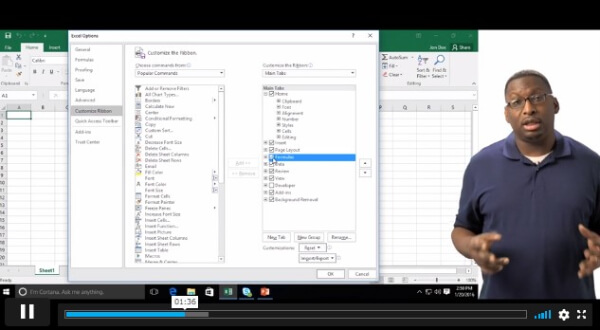
| Customizing the Ribbon | 00:06:00 | ||
| Customizing the Quick Access Tool Bar | 00:04:00 | ||
| Customizing the General and Formula Options | 00:02:00 | ||
| Customzing the Auto Correct Options | 00:04:00 | ||
| Customizing the Save Default | 00:02:00 | ||
| Customizing Advanced Excel Options | 00:03:00 | ||
| Linking Workbooks and Worksheets | |||
| Linking Workbooks and Worksheets | 00:05:00 | ||
| Linking Worksheets with 3D References | 00:03:00 | ||
| Understanding the Consolidate Feature | 00:05:00 | ||
| Working with Range Names and Advanced Formulas | |||
| What are Range Names | 00:03:00 | ||
| Creating Range Names Using the Name Box and Define Name | 00:07:00 | ||
| Creating Range Names Using Create from Selection | 00:03:00 | ||
| Analyzing Data with Common Logical Functions | |||
| Working with the Most Common Logical Functions | 00:03:00 | ||
| Evaluate Data with the AND Function | 00:03:00 | ||
| Evaluate Data with the OR Function | 00:03:00 | ||
| Understanding IF Functions | 00:04:00 | ||
| Nesting AND and OR Inside and IF Function | 00:06:00 | ||
| Analyzing Data with Common Lookup Functions | |||
| What are Lookup Functions | 00:02:00 | ||
| Using VLookup | 00:08:00 | ||
| Using HLookup | 00:02:00 | ||
| Sorting and Filtering Range Data | |||
| Differences Between Sorting & Filtering | 00:02:00 | ||
| Sorting Lists | 00:04:00 | ||
| Filtering Lists | 00:03:00 | ||
| Analyzing and Organizing with Tables | |||
| Creation and Benefits of a Table | 00:02:00 | ||
| Elements of a Table | 00:03:00 | ||
| Formatting a Table | 00:03:00 | ||
| Sorting Tables | 00:02:00 | ||
| Filtering Tables | 00:03:00 | ||
| Filtering with Slicers | 00:03:00 | ||
| Calculating with Tables | 00:04:00 | ||
| Removing Erroneous Table Data | 00:02:00 | ||
| Exporting, Refreshing, Converting Tables | 00:02:00 | ||
| Using Conditional Formatting | |||
| What is Conditional Formatting | 00:01:00 | ||
| Conditional Formatting and Highlight Cells and Top Bottom Rules | 00:04:00 | ||
| Conditional Formatting Data Bars, Icon Sets, and Color Scales | 00:04:00 | ||
| Using Custom Fonts and Colors | 00:02:00 | ||
| Using Custom Conditional Formatting | 00:03:00 | ||
| Modify or Remove Conditional Formatting | 00:02:00 | ||
| Outlining with Subtotals and Grouping | |||
| What are Subtotals and Grouping | 00:01:00 | ||
| Creating Subtotals | 00:03:00 | ||
| Grouping and Ungrouping Data | 00:02:00 | ||
| Displaying Data Graphically | |||
| What are Charts | 00:04:00 | ||
| Creating Charts | 00:04:00 | ||
| Understanding Chart Elements | 00:03:00 | ||
| Modifying Chart Elements | 00:07:00 | ||
| Changing and Moving Charts | 00:04:00 | ||
| Filtering a Chart | 00:02:00 | ||
| Formatting Charts | 00:07:00 | ||
| Adjusting Numbering | 00:03:00 | ||
| Creating Dual Axis Charts | 00:02:00 | ||
| Forecasting with Trendlines | 00:05:00 | ||
| Creating a Chart Template | 00:01:00 | ||
| Displaying Trends with Sparklines | 00:04:00 | ||
| Understanding PivotTables and PivotCharts and Filtering with Slicers | |||
| What is a Pivot Table | 00:04:00 | ||
| Creating a Pivot Table | 00:03:00 | ||
| Working with the Pivot Table Fields Pane | 00:07:00 | ||
| Basic Data Organization and Analysis with Pivot Table | 00:04:00 | ||
| Formatting Pivot Tables | 00:06:00 | ||
| Creating a Pivot Chart | 00:04:00 | ||
| Modifying and Formatting a Pivot Chart | 00:03:00 | ||
| Adding Slicers and Timeline Slicers | 00:03:00 | ||
| Formatting Slicers | 00:03:00 | ||
| Working with Flash Fill | |||
| What is Flash Fill | 00:01:00 | ||
| Using Flash Fill and Autofill | 00:03:00 | ||
| Filling Various Series | 00:04:00 | ||
| Working with Date and Time Functions | |||
| What are Date and Time Functions- | 00:02:00 | ||
| Using TODAY, NOW, and DAY Functions | 00:02:00 | ||
| Using NETWORKDAYS and YEARFRAC Functions | 00:03:00 | ||
| Working with Common Text Functions | |||
| What are Text Functions | 00:01:00 | ||
| Using CONCATENATE | 00:03:00 | ||
| Using Text to Columns | 00:02:00 | ||
| Using LEFT, RIGHT, & MID Functions | 00:02:00 | ||
| Using UPPER, LOWER, & PROPER Functions | 00:02:00 | ||
| Conclusion | |||
| Course Recap | 00:02:00 | ||
PRIVATE
SAVE 0% - OFFER ENDS SOON
![]() |
01 Year of full Course access
Intermediate
Endorsed Certificate of Compleiton